IPWEB Proxy User Guide
1. How to export dynamic residential proxies in the IPWEB dashboard?
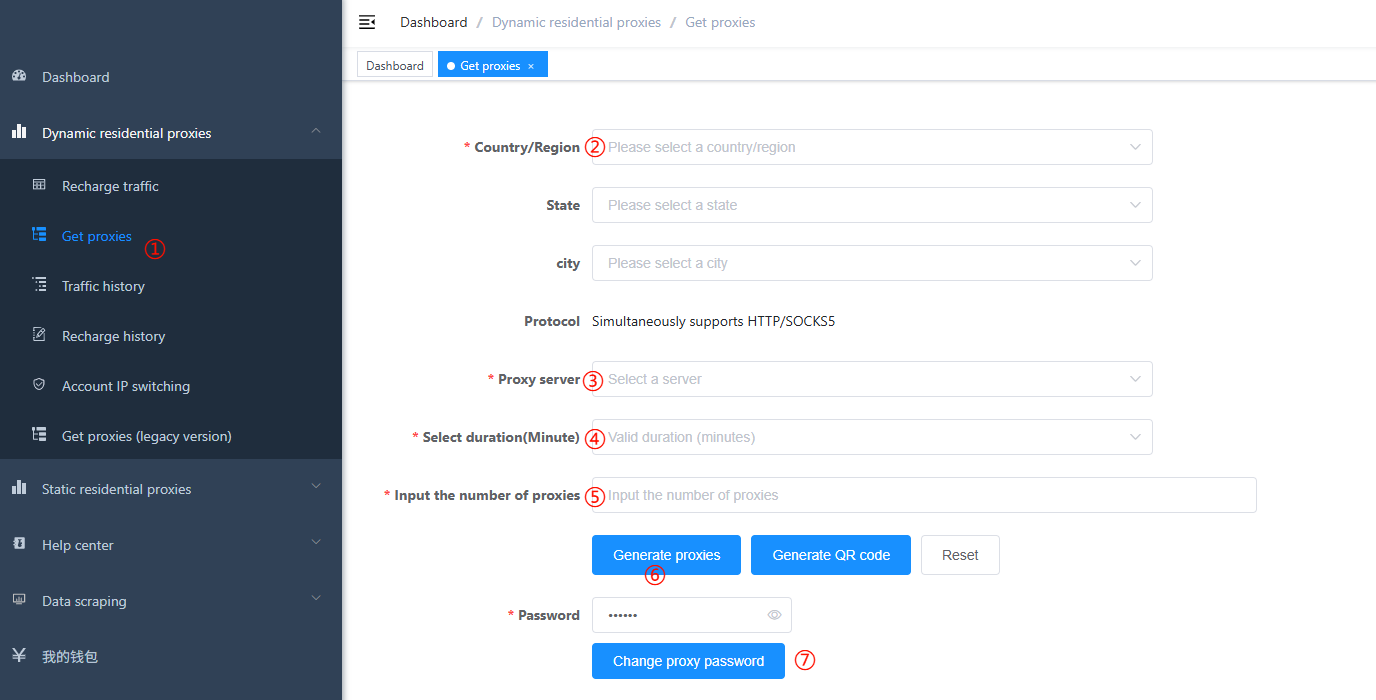
After logging in to the IPWEB dashboard, click Dynamic Residential Proxy in the left menu. You will see the page above. Follow these steps to generate full proxy credentials:
Steps
-
Get proxy: Click Get Proxy on the left (step ① above).
-
Country/region: Choose the country that matches your use case. For example, select United States if you need US IPs (step ②). If you do not need state/city-level targeting, leave State and City empty to receive IPs from anywhere in that country.
-
Proxy server: After you select a country, IPWEB assigns a proxy server automatically (step ③).
-
IP session duration: Maximum time a single IP can be used. When the period ends, the IP rotates without disconnecting your session—the account stays usable; only the exit IP changes. Choose a duration that fits your workload (step ④).
-
Proxy count: Number of proxy lines to export. For example, enter
5for five lines (step ⑤). Each export is limited to 1,000 lines. For larger scale, use custom proxy accounts: export one line and derive unlimited variants. If you use custom accounts, exporting a single reference line is enough. -
Generate: After completing the steps above, click Generate Proxy to download a
.txtfile with your proxies (step ⑥). -
Change proxy password: Set a proxy password the first time you generate accounts. This password applies to generated proxy credentials. Password updates take about one minute to take effect. If credentials leak, change the password immediately.
2. What do the exported proxy fields mean?
Open the downloaded .txt file to view proxy lines.
IPWEB follows SOCKS5/HTTP proxy conventions. Username/password format:
proxy_host(IP_or_domain):port:username:password
Some providers use:
username:password:proxy_host(IP_or_domain):port
Example
Sample line:
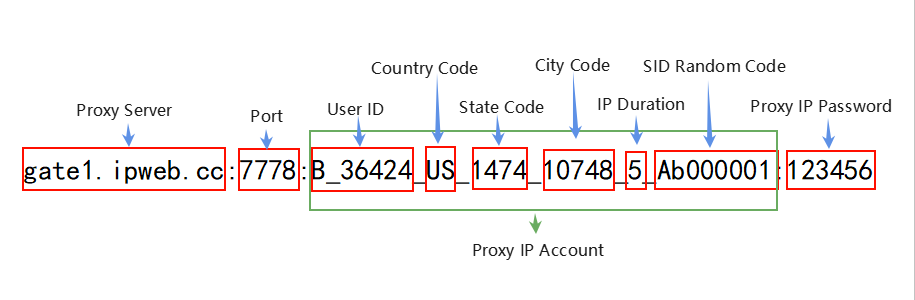
gate1.ipweb.cc:7778:B_36307_US_1474_10748_5_Ab000001:123456
Field breakdown:
- Proxy server:
gate1.ipweb.cc - Port:
7778 - User ID:
B_36307 - Country code:
US - State code:
1474 - City code:
10748 - Session duration (minutes):
5 - SID:
Ab000001 - Proxy password:
123456 - Protocols: SOCKS5 and HTTP(S) on the same port
Diagram
Verify the proxy
Test the exported line with curl:
curl -x B_36424_US_1474_10748_5_Ab000001:123456@gate1.ipweb.cc:7778 ipinfo.io
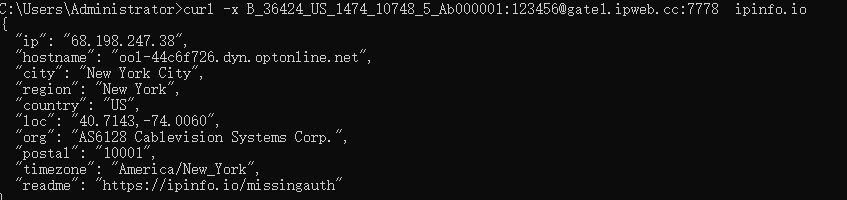
A successful response shows a US IP (country US), New York state (code 1474), New York City (code 10748).
3. How to build proxies with custom account rules?
Custom proxy accounts follow IPWEB formatting rules—manually or programmatically—to produce the proxy lines you need.
3.1 Change country, state, and city codes
From the sample above, change country/state/city codes to target other locations. State and city are optional:
gate1.ipweb.cc:7778:B_36424_US___5_Ab000001:123456
Empty state and city means any location within the US.
Where to find codes?
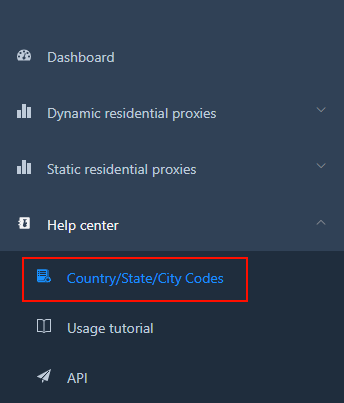
Log in at https://ipweb.cc/iproxy/login → Help Center → Country/Region/City Codes for 200+ countries and ~20,000 cities.
3.2 Change country and session duration
Starting from:
gate1.ipweb.cc:7778:B_36424_US___5_Ab000001:123456
For Hong Kong, replace US with HK:
gate1.ipweb.cc:7778:B_36424_HK___5_Ab000001:123456
For a 10-minute session instead of 5, change 5 to 10:
gate1.ipweb.cc:7778:B_36424_HK___10_Ab000001:123456
3.3 Generate many proxies by changing SID
Example base line:
gate1.ipweb.cc:7778:B_36424_US_1474_10748_5_Ab000001:123456
Change the SID to obtain different exit IPs:
gate1.ipweb.cc:7778:B_36424_US_1474_10748_5_Ab000001:123456
gate1.ipweb.cc:7778:B_36424_US_1474_10748_5_Ab000002:123456
gate1.ipweb.cc:7778:B_36424_US_1474_10748_5_Ab000003:123456
...
gate1.ipweb.cc:7778:B_36424_US_1474_10748_5_X9999999:123456
Note: SID must be exactly 8 alphanumeric characters (letters and digits). Special characters (e.g.
@!%*) are not allowed.
Changing SID lets you scale proxies or rotate IPs on demand.
3.4 Worldwide random proxies
Set the country code to 000 for a random country:
gate1.ipweb.cc:7778:B_36424_000___10_Ab000001:123456
4. How to choose a proxy server?
IPWEB operates gateways in three regions:
- Americas (North & South):
gate1.ipweb.cc:7778 - Asia-Pacific (incl. Oceania):
gate2.ipweb.cc:7778 - Europe & Africa:
gate3.ipweb.cc:7778
Pick a gateway based on your workload and where your application runs. The auto-assigned gateway usually offers the lowest latency. Contact IPWEB support if you need help choosing.